top of page

Privacy Manager
Improving an advanced privacy control center that enabled users to make informed and efficient mobile privacy decisions
.png)
Overview
Privacy Manager is a privacy control center of the Privacy-Enhanced Android OS which allows users to get crucial information on how their sensitive data is accessed.
A DARPA-led and funded project via their mobile-CRT teams, I got the opportunity to contribute in improving the efficiency of Privacy Manager by redesigning its two key flows - App and Global Setting, and by introducing two new features such as Frequency Visualization and Recommendations to support users in making informed and efficient decisions for mobile privacy control.
Privacy Manager - an advanced privacy control center providing a key breakdown of how data is accessed by mobile apps

Role
Interaction Design
UX Research
Duration
8 Months
(August 2019 - March 2020)
Team Members
Jason Hong, Judy Chun, Shan Wang, Mike Czapik, Jessica Zhang
Problem
Issues in the Current Space


-
Mobile Privacy is an increasing concern among many smartphone users.
-
While current OS systems such as Android 10 offer information about what data (permission) is being accessed, they don’t give any insightful details about how these data get used and how it affects the user.
-
Many users feel paranoid and confused when granting permissions to apps as they don’t want to see targeted ads and don’t want apps to record their data for unknown reasons.
-
They want to understand and control data access according to their needs.
Initial Designs of Privacy Manager weren't effective

Technical jargon didn't make much sense to users and the bulk of information overwhelmed them.
The display of granular information such as who is asking for the data and why wasn't enough in supporting users to make effective decisions on their privacy settings.
Problem Statement
How might we improve users' understanding of the reasons behind data access so that they can make relevant and effective privacy decisions specific to their needs?
Problem Space
Design Process
Our team started with researching the problem space where I contributed to the planning, conducting, and synthesizing of research. As we discovered insights, I led design explorations to develop concepts that can improve users' experience. A series of designing and testing refined the final product.

Design Process
Research Exploration
We used 3 research methods to tackle the problem space. Testing and evaluation of existing designs along with researching users' behavior around privacy were used to understand the users, their pain points, and needs.


Comprehension Survey
Critique & Participatory Design
Exploratory Interviews
What we did: Conducted a survey with 70+ users where we showed them a design snapshot and asked comprehension questions.
What we did: Conducted a critique session along with participatory design with 6 users on app and global settings
What we did: Conducted an exploratory interview with 5 users, using broad prompts and images to invoke response.
Why: To evaluate how well users understood the different levels of information, with larger user base.
Why: To evaluate in-depth users' expectations and needs around privacy and how it impacts them.
Why: To dig deeper into current pain points around managing privacy and how users tackle them.
Key Findings
Users didn't understand the different types of information (permission, purpose, third-party) and many failed to differentiate and understand their relationship.

20%
respondents identified purposes correctly, rest all seemed to be weak at identifying why the app is requesting the permission

5%
respondents fully understood what "third-party use" means. They didn't recognize that data can be used by other apps and third-parties
Most users found a high learning curve for using Privacy Manager as it made them overwhelmed with excess information that didn't match their understanding or expectation of how data is accessed.


Users wanted to be made aware of harm instead of having to understand that by themselves. They also wanted support to make their preferred decisions for securing their mobile privacy.


Points of opportunity identified
Triangulating data from research to devise a more effective Privacy Manager
1. Low affordance in design led to missing out on key information
2. Lack of visual and naming consistency made it hard to differentiate between different policy levels
3. Visual clutter made the experience overwhelming
4. Discovery of information didn't match the user's mental model
5. User seek more information to learn about their privacy - opportunity to provide deeper understanding
6. User need support to manage multiple granularity of control over time
Research
Redesigning the flows with improved Information Architecture
We designed the app settings flow and improved it's hierarchy and visual clutter to increase the discoverability of the policies and make them more actionable for the users
Clear segway to third parties using progressive disclosure to make content digestible
Providing descriptors for purposes with the improved hierarchy to identify and differentiate from permissions
Organizing by who is collecting data to improve the discoverability

Developing Concepts to improve user understandability
Based on our research findings, we brainstormed on the different ways to present information to users such that it matches their mental model and makes it easier for them to understand and relate the different levels of granularity. Two significant most ideas were presented to users via a concept testing research method to learn more about their preference and improve the design as per their needs.
App Settings: Allows users to configure permissions one app at a time

Concept A:
To organize all permissions based on App Internal Use & Third parties

Concept B:
To control settings based on one permission at a time
Improved App Settings Flow

Users focus on one permissions entirely when evaluating it


Users appreciated the differentiation between internal and third-party
Global Settings: Allows users to configure permissions for multiple apps at once

Concept A:
To control based on purposes across multiple apps collectively

Concept B:
To control permissions based on apps requesting it
Improved Global Settings

Users related this design to current patterns and found it familiar
Users appreciated the list of apps under purpose to compare
Design
Creating new features that support users' decision making process
Privacy Visualization: Overview on top data access over time
.png)
Concept A:
To create awareness around most used data in a week

Concept B:
To create awareness around where user's data action stands with respect to public
Users appreciated a visual overview of most accessed data

Users wanted more context about which apps use their data most
Users liked that the overview consisted of data they cared about
Users didn't care to compare their data with others
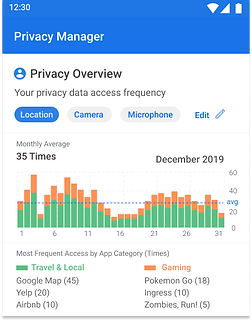
Final flow for Visualization
We chose the first concept as that was a clear winner in terms of addressing user needs and we added some context based on type of app category and apps that used data - so that users can relate to their usage of their phone based on their activities and become aware of the data use
Recommendations: Suggestions on permission configurations based on past behavior

Concept A:
To provide recommendation by purposes
Users liked suggestions based on past activity
users found it not supportive in helping them take a decision
.png)
Concept B:
To provide recommendation by permission
Permission first approach helped them get better context
users found it not supportive in helping them take a decision

Final flow for Recommendations
Key improvements to recommendation required bringing to focus why the suggestion is being made and giving them a quick button to act on it.
Prototype
Prototyping and Testing
Flow Map
We mapped out a flow diagram of user actions to help design the entire prototype


Usability Testing
We conducted a 6 task long usability testing that focused on each flow and its important features. We recorded user reactions, time on task, task completion, user satisfaction score and more to understand the impact and improvement our designs have made.
The tasks were similar to a previous usability testing that helped us compare the performance of our design to previous designs that we started this project with.


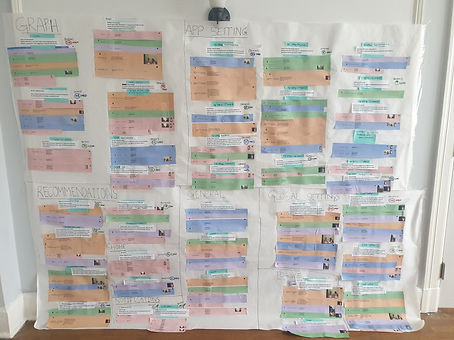
Key Findings
1. Due to some fairly new interactions, users needed some prompt or awareness to inform them about features that are part of the progressive disclosing flow.
2. Users wanted more insight from the Privacy Overview Visualization as they wanted to understand the pattern of data access over time.
3. Users responded the best when designs were familiar to existing Android patterns on Privacy Settings. There lies an opportunity to make things familiar while introducing new patterns so that users can learn more information in familiar settings.
Testing
Solution
A newly improved Privacy Manager that makes it easier for users to understand how and why their data is accessed and used and new supporting features such as Visualizations and Recommendations to support users in making relevant and useful privacy decisions.
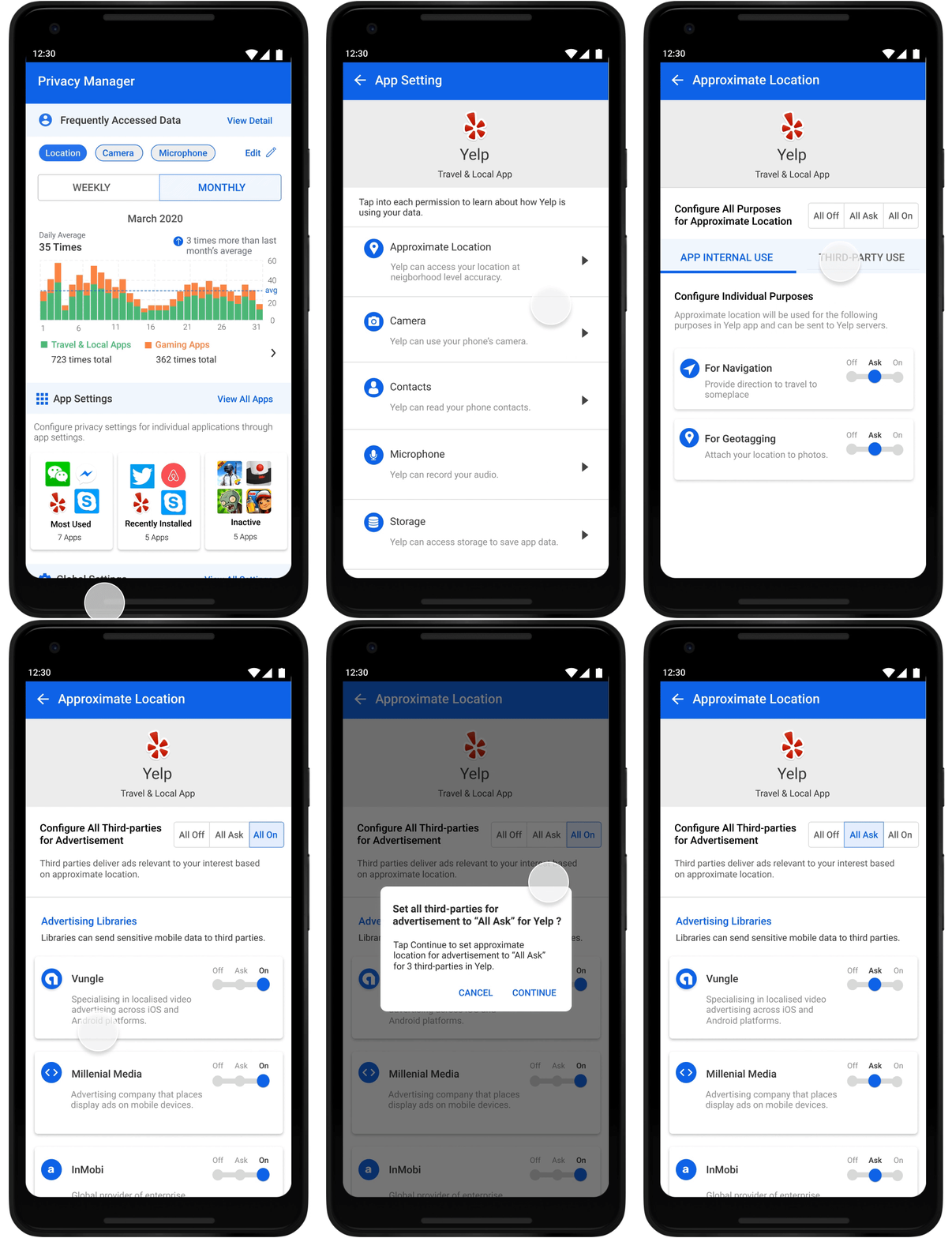
App Settings Flow
App Settings allow users to configure privacy settings such as permissions, purposes, and third parties, for one app at a time.

Progressive disclosure allows users to be aware
Tabs orient user's thinking for how they want to grant
Purpose based display explains the data access
Feedforward to find more relevant information
Global Settings Flow
Global Settings allow users to configure settings at permission-level and purpose-level for all apps together at once.

Allows users to control at permission level for all apps
Progressive disclosure aids users' understanding of how data is accessed
List of apps help them compare and get an overview of data access
Understand how single permission is used for various purposes
Privacy Overview Visualization Flow
Privacy Overview gives a detailed report of the user’s most accessed data permissions over monthly and weekly views.

Shown with top used permissions in 2 views to center user's attention
Displaying data access by app categories to relate to their phone activity
List of apps allow them to take note of usage and compare with other apps
Mini data display of increase and decrease of data access to show trends
Recommendations Flow
Privacy Manager provides recommendations for privacy settings based on the user's past configured settings for similar apps.

Suggesting privacy settings based on users' past behavior
Quick action button to apply the settings without having to visit multiple app settings
Providing additional resources to support users' understanding in more depth
Solution
Results
50%
Reduction in
Time-on-Task
40
NPS Rating
73rd
SUS Rating
70%
Success Rate
Next Steps
-
Evaluate with a larger user base over a period of time
-
Measure/Capture the following via surveys:
-
Usefulness
-
Issues
-
Would they recommend it to a friend?
-
Satisfaction
-
-
Improve the onboarding experience to ensure users understand what they can achieve
Results
bottom of page